Data Storage Solutions for Your Every IT Need

SOFTWARE-DEFINED STORAGE
GET IT DONE RIGHT.
OVERCOME YOUR CHALLENGES.
Infrastructure Modernization
Expand/refresh/modernize storage and migrate data non-disruptively
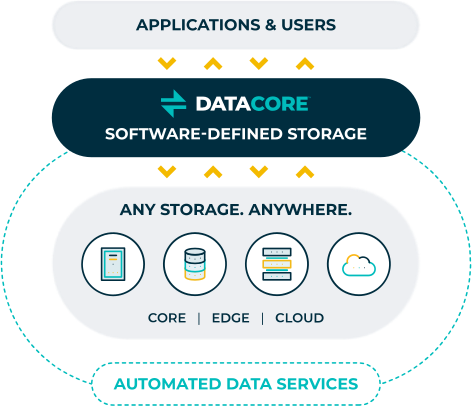
Your Storage Can Do More
Maximize the value of your investments by leveraging advanced data services while reducing costs across core, edge, and cloud storage.
Over 10,000 customers – from SMBs to large enterprises and service providers – have benefitted from using DataCore:
data access
storage costs
Powering Data Excellence
Data is the heartbeat of today’s digital world. By enabling reliable data governance and storage management, we propel you to achieve tangible business outcomes. Experience the DataCore advantage, where your data is our foremost priority!
Trusted by Global Brands, Loved by IT Pros





“DataCore is definitely one of the main reasons our mission-critical apps run faster. We now have continuous availability made possible by the synchronous mirroring.”

“DataCore’s scalability in terms of capacity, performance and functionality gives us the flexibility to respond to further challenges, whether it is on the ships or for the entire fleet.”

“DataCore works extremely well from a high availability standpoint and allows for proactive and reactive failures – while still providing high performance.
With DataCore, we can always stay up.”

“Now with DataCore, we don’t have to buy tier 1 storage everywhere. Because we are not tied to a particular vendor, we can always just get the best storage for what we are trying to accomplish – whatever makes the most sense in terms of price point.”

“No more vendor lock-in, overpriced drives, or forklift upgrades. With DataCore, you can utilize just about any storage you wish such as SAN, NAS, JBOD, etc. The ability to pool storage to leverage thin-provisioning is a huge saving in space and costs.”

Rewarded for Our Commitment to Innovation and Customer Service


No More Downtime.
Superior App Performance.
Low Storage TCO.
Join thousands of IT pros who have benefitted from DataCore solutions.

“DataCore is definitely one of the main reasons our mission-critical apps run faster; the SANsymphony caching and performance acceleration capabilities play a vital role.”

Lamar Nicholson
Storage & Virtual Environment Architect